
Aadhaar-bank account seeding is the process of linking your Aadhaar number to your bank account and mapping it with NPCI so that government benefits and scholarships can be credited through the Direct Benefit Transfer (DBT) system.
The Government of India has made Aadhaar-bank seeding, also known as NPCI mapping, mandatory for all government schemes and scholarship beneficiaries, including NSP scholarships. Without proper Aadhaar seeding, scholarship and scheme benefits cannot be credited to the beneficiary’s bank account.
Earlier, beneficiaries had to visit their bank branch in person to complete NPCI mapping. To simplify this process, the National Payments Corporation of India (NPCI) introduced an online initiative called the Bharat Aadhaar Seeding Enabler (BASE). Through this platform, citizens can:
- Seed Aadhaar with their bank account online
- Check Aadhaar-bank seeding (NPCI mapping) status
- Change NPCI mapping from one bank account to another
In this post, we explain how to seed Aadhaar with a bank account online and how to check NPCI mapping status using the NPCI BASE portal, which is essential for receiving NSP scholarship payments.
How to Seed Aadhaar with a Bank Account Online?
Follow the steps below to seed your Aadhaar with a bank account online using the NPCI BASE portal.
Step 1: Visit the official website of NPCI (National Payments Corporation of India) at npci.org.in. From the Customer menu, select the Bharat Aadhaar Seeding Enabler (BASE) option.
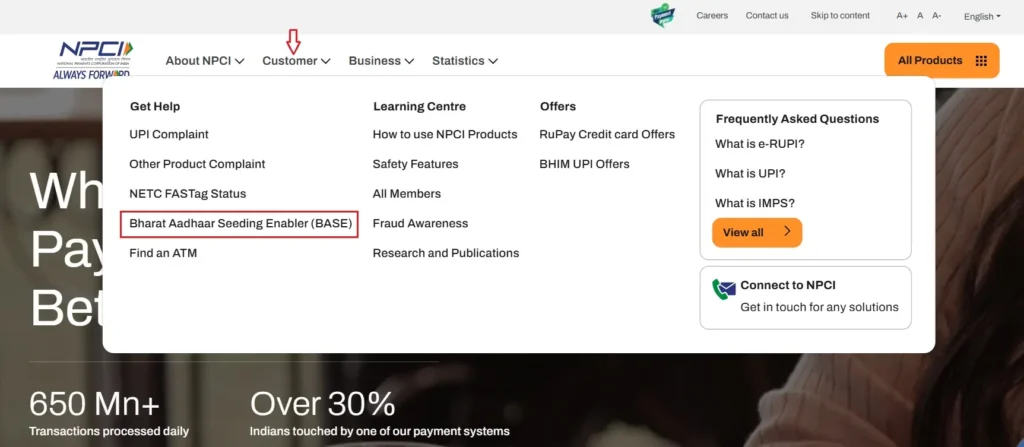
Step 2: You will be automatically redirected to the NPCI BASE portal.
Note: The NPCI BASE portal cannot be accessed directly. You must always enter it through the official NPCI website.
Step 3: On the left sidebar, select the “Aadhaar Seeding / De-Seeding” option, as shown in the image below.
Step 4: Enter your 12-digit Aadhaar number carefully and select the “Request for Aadhaar Seeding” option.
Next, choose the bank name from the dropdown list to which you want to map your Aadhaar for receiving government scheme or scholarship payments.
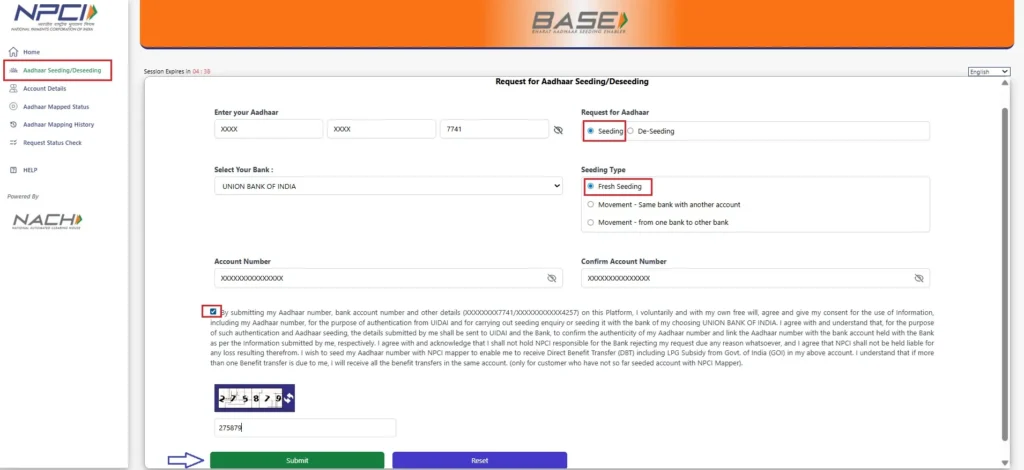
Now, select the seeding type as applicable:
- Fresh Seeding: If you are seeding your Aadhaar with a bank account for the first time.
- Movement – Same Bank, Another Account: If you want to change NPCI mapping from one account to another within the same bank.
- Movement – From One Bank to Another Bank: If you want to move NPCI mapping from one bank account to a different bank.
Step 5: Enter your bank account number in the given field and re-enter the same number in the Confirm Account Number field to avoid mistakes.
Step 6: Read the declaration, accept it, enter the captcha displayed on the screen, and click Submit.
You will receive a 6-digit OTP on the mobile number linked with your Aadhaar. Enter the OTP and click Confirm.
That’s it!
Your Aadhaar-bank seeding request will be processed by NPCI within 3-7 working days. Once completed, your bank account will be enabled for DBT, allowing you to receive NSP scholarship and other government scheme payments.
How to Check Aadhaar-Bank Account Seeding (NPCI Mapping) Status Online?
If you want to check whether your bank account is seeded with Aadhaar and whether NPCI mapping is active, follow the steps below.
Step 1: Go to the official portal of NPCI at npci.org.in. From the Customer menu, select the Bharat Aadhaar Seeding Enabler (BASE) option.
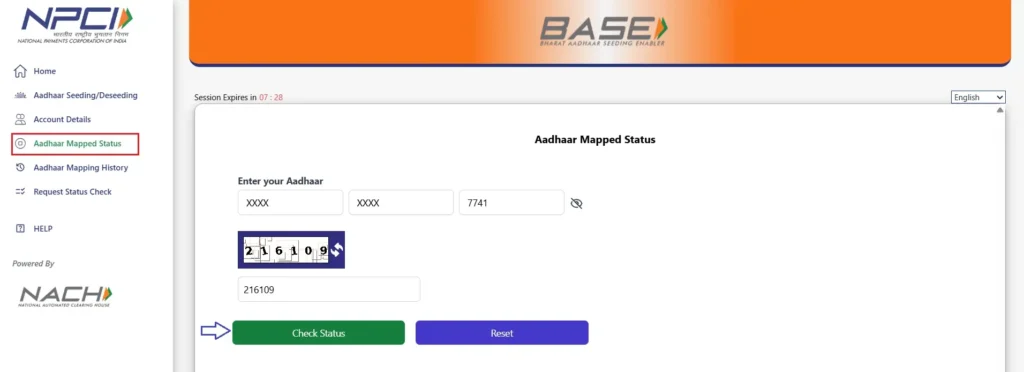
Step 2: On the left sidebar, click on the “Aadhaar Mapped Status” option.
Enter your Aadhaar number and the captcha displayed on the screen, then click Check Status.
Step 3: You will now receive a 6-digit OTP on the mobile number linked with your Aadhaar. Enter the OTP and click Confirm to view your NPCI mapping status.
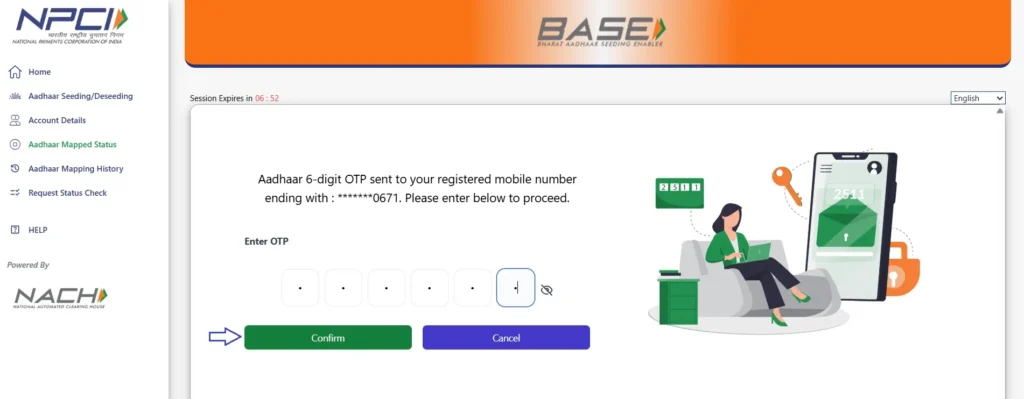
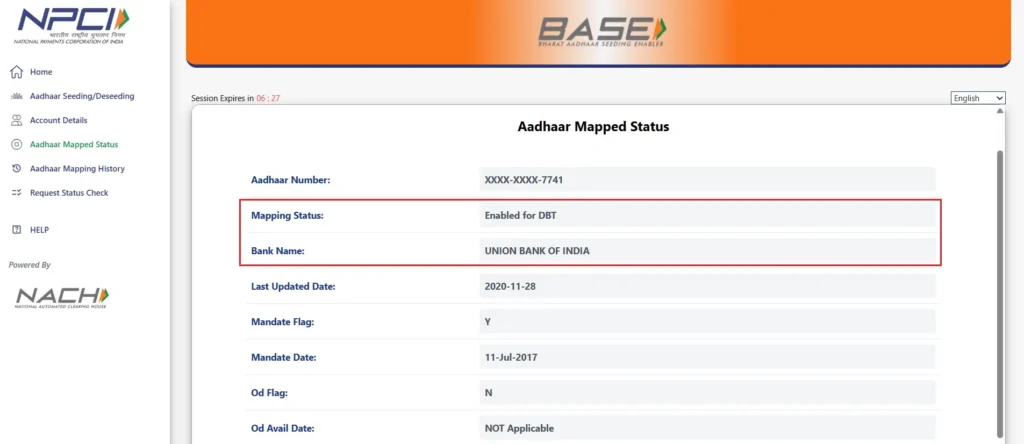
Once verified, the portal will display your Aadhaar-bank mapping status.
If the status shows “Enabled for DBT”, it means your Aadhaar is successfully mapped with NPCI. You will also be able to see the name of the bank to which your Aadhaar is currently linked.
FAQ’s
How long does Aadhaar-bank seeding take after submitting the request online?
After submitting the request on the NPCI BASE portal, Aadhaar-bank seeding usually takes 3 to 7 working days. The exact time may vary depending on your bank’s processing speed.
Can I seed Aadhaar with more than one bank account?
You can link Aadhaar with multiple bank accounts, but only one bank account can be active for DBT (NPCI mapping) at a time. Government benefits and scholarships will be credited only to the currently mapped account.
What should I do if my NPCI mapping status shows Disabled or Inactive?
If the status is not shown as Not-Enabled for DBT / Inactive, you should:
a. Submit a fresh seeding request through the NPCI BASE portal, or
b. Contact your bank branch to verify Aadhaar and NPCI mapping details
Without an active DBT status, scholarship payments may fail.Is Aadhaar-bank seeding required every year for NSP scholarships?
No. Aadhaar-bank seeding is not required every year. Once your Aadhaar is correctly mapped with NPCI and remains active, it can be used for future NSP scholarship payments unless you change your mapped bank account.
Will changing my bank account affect future scholarship payments?
Yes. If you change NPCI mapping to a different bank account, future DBT payments will be sent only to the newly mapped account. Make sure the new account is active and Aadhaar-linked before changing the mapping.