
The NSP (National Scholarship Portal) hosts a wide range of scholarship schemes under different government departments. Each scholarship scheme has its own eligibility criteria, and going through the eligibility details of every scheme can be time-consuming and confusing for students.
To solve this problem, the National Scholarship Portal has introduced a tool called the NSP Scholarship Eligibility Checker. Using this tool, students can enter their personal, income, and educational details and instantly view only the list of scholarship schemes they are eligible for. This helps students identify the right scholarships and apply within just a few minutes.
This tool eliminates confusion and makes the scholarship application process easier and smoother. On this page, we have explained the simple steps you can follow to use the NSP Eligibility Checker and find the scholarships you are eligible to apply for.
Why Should You Use the NSP Scholarship Eligibility Checker Tool?
- The tool shows only those scholarship schemes you are eligible for, based on your personal and academic details.
- It helps you avoid applying for ineligible schemes, which often leads to application rejection.
- Saves a lot of time and effort by removing the need to read eligibility criteria for every scholarship.
- Reduces confusion caused by multiple schemes with similar names.
- Helps first-time applicants understand which scholarships they can apply for.
- Improves your chances of successful application approval.
- Makes the overall scholarship application process simple, quick, and stress-free.
How to Use the NSP Eligibility Checker to Find Eligible Scholarship Schemes?
Follow the steps below to find the eligible scholarship schemes on the National Scholarship Portal.
Step 1: Visit the official NSP (National Scholarship Portal) at scholarships.gov.in. On the home page, click on the “Public” option.
Step 2: The Public Services page will open. Under the Scholarship Eligibility service, click on “View”.
Alternatively, you can directly visit the NSP Eligibility Checker page using the button provided below.
Step 3: Enter your basic details such as state name, student name, gender, date of birth, annual family income, and other required personal information. These details help the NSP portal display scholarship schemes that match your profile.
Step 4: Click on “Select Institute Name”. A popup window will appear where you can search for your school or college using:
- Institute name, or
- AISHE / ITI (NCVT) Code / UDISE+ Code
If you do not know your institute code, you can simply search by institute name.
First, select your state and district, then enter the first few characters of your institute name.
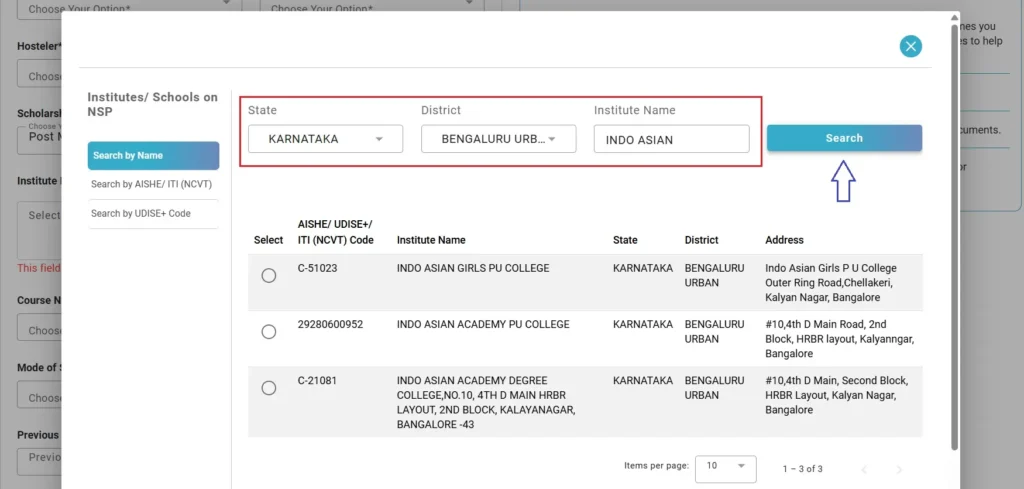
Example:
If your college name is INDO ASIAN GIRLS PU COLLEGE, enter INDO ASIAN and click Search.
A list of matching institutes with full addresses will be displayed. Select the correct institute and proceed to the next step.
Step 5: Enter your current course details, such as course name and mode of study. Then provide details of your previous class or course, including previous class percentage, year of passing, and board/university.
Step 6: Enter your Class 10 and Class 12 details. (Diploma or Polytechnic students are required to enter only Class 10 details).
Step 7: Carefully review all the details entered in the previous steps, as the list of scholarships will be shown based on the information provided by you.
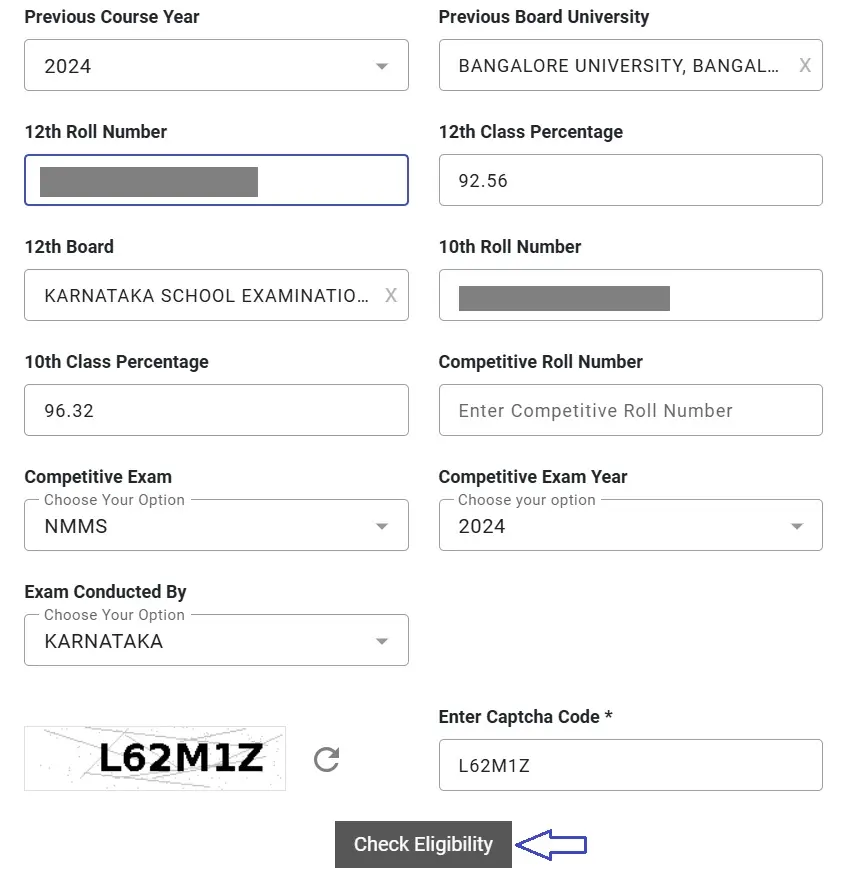
If everything looks correct, enter the captcha displayed on the screen and click the “Check Eligibility” button.
That’s it! All the eligible scholarship schemes will be displayed on your screen. You can go through them one by one and apply for the schemes you qualify for.
Also Read:

NSP OTR Registration 2025-26: Complete Step-by-Step Guide

NSP Scholarship Status 2025-26: Check Application & Payment Status
Important Instructions
- Double-check all the details entered in the NSP Scholarship Eligibility Checker and ensure the information is accurate and complete. Correct details help the tool show the most accurate eligibility results.
- If you find that you are not eligible for a particular scholarship scheme, recheck the details you entered to make sure they are correct. You can also click on “Why I’m not eligible for this scheme” to understand the exact reason for ineligibility.
- After submitting your details, all eligible scholarship schemes will be displayed along with their last date and guidelines. Carefully read the scheme guidelines to clearly understand the benefits, eligibility conditions, and terms, and make sure to apply before the deadline.
FAQ’s
Does using the NSP Eligibility Checker guarantee scholarship approval?
No. The Eligibility Checker only helps you identify schemes you may be eligible for based on the details entered. Final approval depends on document verification, institutional checks, and department validation.
What should I do if my institute name is not appearing in the list?
First, ensure you have selected the correct state and district. Try searching with fewer characters of the institute name. If it still does not appear, contact your institution administration to confirm whether it is registered on NSP.
Is it mandatory to apply for all schemes shown in the eligibility list?
No. You are not required to apply for every scheme shown. Review the benefits, eligibility conditions, and deadlines of each scheme and apply only for those that best suit your situation.
Will the eligibility results change if I enter incorrect or incomplete details?
Yes. The results shown by the Eligibility Checker are entirely based on the information you provide. Entering incorrect or incomplete details may show wrong results or make you appear ineligible for valid schemes.