
Once students complete the online application for the NSP scholarship through the National Scholarship Portal, the next common question that arises is how to track the NSP scholarship status. In fact, all students are advised to regularly track their application status to understand the current stage of their scholarship application.
On this page, we have explained the step-by-step procedure to:
- Track NSP scholarship application status through the NSP portal, and
- Check NSP scholarship payment status directly through the PFMS portal using your bank account number.
Part A: Check NSP Scholarship Payment Status on PFMS Portal
Follow the steps below to directly track your NSP scholarship payment status through the PFMS (Public Financial Management System) portal. This portal records all scholarship payments made by the Government of India.
Step 1: Visit the official PFMS (Public Financial Management System) portal at https://pfms.nic.in/. From the menu, select the “Know Your Payment” option, or click the button provided below to directly access the payment status page.
Step 2: Type the first few characters of your bank name that is linked with your Aadhaar. Your full bank name will appear in the list. Select the exact bank name shown by the PFMS portal. (Note: You cannot manually type the full bank name. Enter the initial characters correctly and select the bank name displayed by PFMS.)
Example: Type “State Bank” , The portal will display State Bank of India. Then, Select it and proceed to the next step.
Step 3: Carefully enter your Aadhaar-seeded bank account number in the given field. If your bank account is not linked with Aadhaar, PFMS may not be able to display your NSP scholarship payment status. In such cases, first get your bank account Aadhaar-seeded.
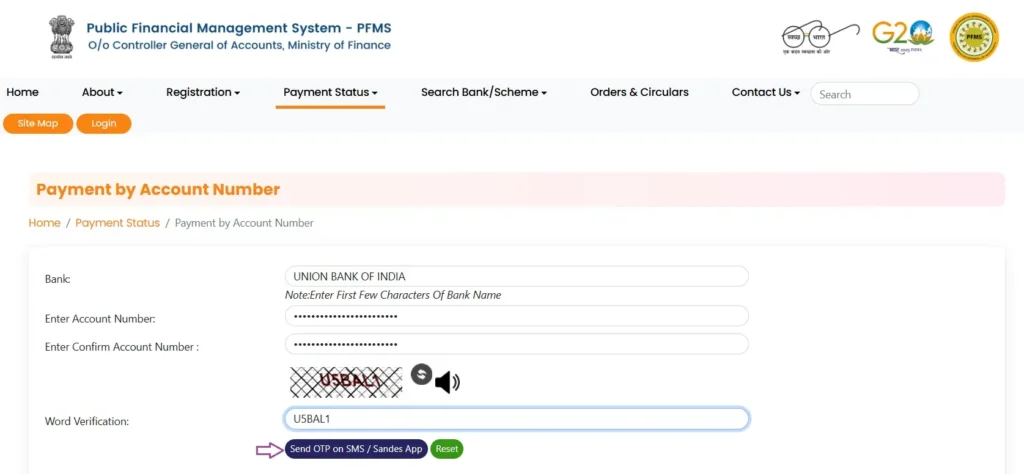
Step 4: Re-enter the bank account number once again. Ensure that both entries match exactly before proceeding.
Step 5: Enter the captcha as shown on the screen and click Send OTP on SMS. An OTP will be sent to the mobile number linked with your bank account/Aadhaar.
Step 6: Enter the OTP received on your mobile number and click Verify OTP. This confirms your identity and allows you to view the payment status. (Important: If the mobile numbers linked with your bank account and Aadhaar are different, please check both mobile numbers for the OTP)
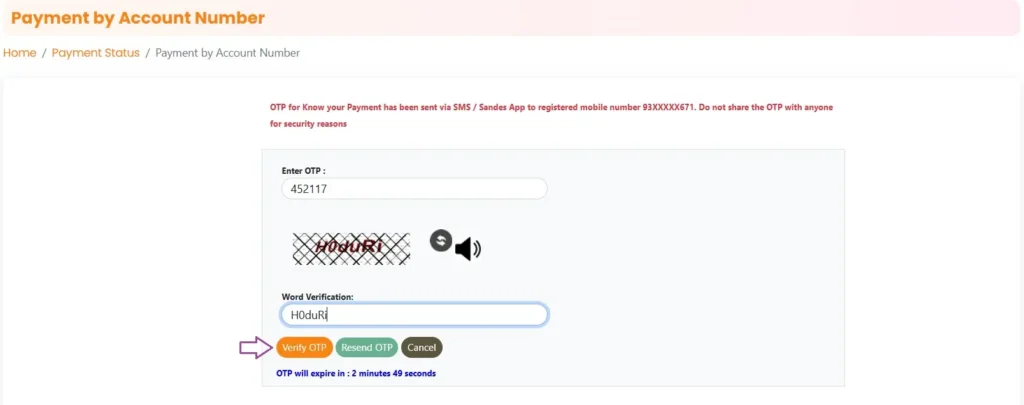
Step 7: After verification, PFMS will display a list of all scholarship transactions. Look for entries related to NSP scholarship payments or those mentioning the concerned department or scheme. Click on any transaction to view details such as UTR number, credited amount, and credit date.
If no transactions are displayed, it means your NSP scholarship amount has not yet been processed under DBT or has not been credited to your bank account yet.
Part B: Check NSP Scholarship Application Status (scholarships.gov.in)
Follow the steps below to check your NSP scholarship application status through the NSP Portal.
However, please note that application status is currently available only for the academic years 2022–23 and 2023–24.
From the academic year 2024–25 onwards, students are advised to directly check the scholarship payment status on the PFMS portal, as explained above.
Step 1: Visit the NSP portal and, on the home page, select the “Students” option. The Student Dashboard page will open. From there, select “Application Status for Academic Year 2022–23 and 2023–24”, or use the link provided below.
Step 2: Select the academic year (2022–23 or 2023–24) from the dropdown menu and choose the type of application (Fresh or Renewal).
Step 3: Enter your NSP scholarship Application ID (printed on your acknowledgment receipt) and the password created during account registration. Then click the Login button
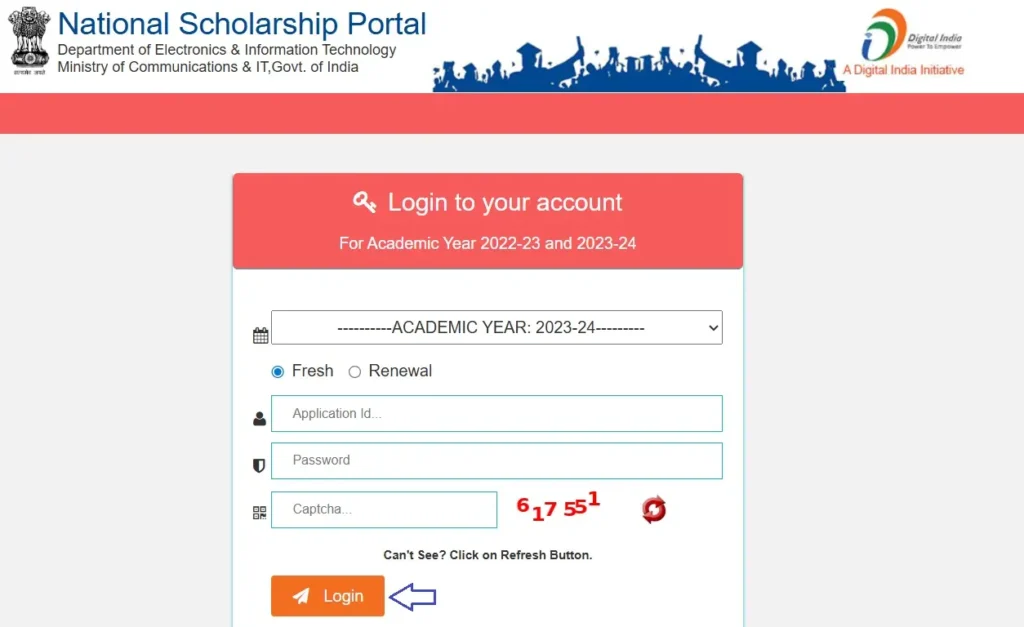
Step 4: From the dashboard, select “Application Status” or “My Applications”. The portal will display your application along with its current stage and history of actions (such as submitted, verified, sent for payment, etc.)
Understanding NSP Application Status Labels
The NSP portal uses different status labels to show the progress of your application. Below is what each status usually means:
- Submitted: Your application has been successfully submitted and is awaiting verification by the institute.
- Institute Verified: Your college or school has verified and forwarded your application.
- Department / District Verified: The concerned department has verified your documents and eligibility.
- Approved: Your application has been approved and sent for payment processing (DBT).
- Sent to PFMS: The payment request has been forwarded to PFMS and is waiting for disbursement.
- Rejected: Your application has been rejected. The reason will be shown on the portal. You may need to correct the issue and reapply, if applicable.
FAQ’s
My application shows “Approved” but payment is not credited. What does this mean?
“Approved” means your scholarship has cleared all verification stages. The payment will be credited only after it is processed through PFMS. In such cases, check your payment status on the PFMS portal for the latest update.
Why is my NSP scholarship not showing on PFMS yet?
If your scholarship is not visible on PFMS, it usually means:
a. Payment is not yet pushed to DBT, or
b. Your bank account is not Aadhaar-seeded, or
c. Payment processing is still in progress
In most cases, students need to wait for the next payment cycle.Can I check NSP payment status using Application ID instead of bank account number?
No. PFMS allows payment tracking only through bank account details. NSP Application ID cannot be used to check payment status on PFMS.
What should I do if PFMS shows payment credited but money is not received in my bank?
First, check your bank statement carefully. If the amount is still not credited:
a. Contact your bank branch with the UTR number
b. Ensure your bank account is active and Aadhaar-linked
In most cases, banks resolve this within a few working days.My application status is stuck at “Institute Verified”. Is this normal?
Yes. After institute verification, applications move to district/state/department verification, which may take time depending on workload and timelines set by authorities.
What does “Sent to PFMS” status actually mean?
“Sent to PFMS” means your scholarship payment request has been forwarded for final fund release. This is the last stage before credit, and payment usually reflects in PFMS shortly after.
Can I check NSP application status for 2025–26 on the NSP portal?
No. As of now, the NSP portal shows application status only for academic years 2022–23 and 2023–24.
For 2024–25 and 2025–26, students should track payment status directly on PFMS.What should I do if my NSP application is rejected?
If your application is rejected, the reason will be displayed on the NSP portal. Based on the reason, you may need to:
a. Correct documents (if allowed)
b. Reapply in the next academic year
c. Contact your institution for clarification